Sep 4, 2026 · by Terry Peterson · claudeworkflowhabitscli
Who this is for: People who use Claude Code in the terminal (CLI). Browser-only AI users: the idea carries over, but use your AI to re-write the steps.
Claude Code has a context window, the amount of conversation it can hold before it
starts forgetting. If you run it to the end usually before starting a new convo, try hitting the brakes at 60% remaining, write the /handoff, and start fresh next time.
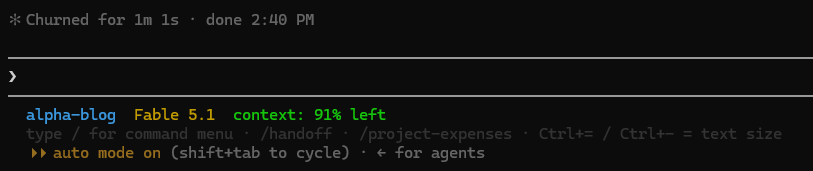
The first thing I did was make the number visible. I had Claude Code modify its own
status line so the context percentage sits in the footer of every session. Always visible, impossible to blow-past it without noticing.
I started doing this to save tokens, and it does save some. Every message you send
re-sends the whole conversation, so a session at 80% full costs about twice as much
per turn as one at 40%. On a 1M window, it’s a minor thing but an added benefit.
The real benefit is quality. A full session is a worse session:
Early instructions fade. Something you said in the 3rd message gets diluted by the 40th message.
Settled questions get reopened. The decision was made an hour ago; it’s still
in context, but buried. The AI re-argues it.
Compaction hits at the worst time. When the window fills, the tool summarizes
the conversation to make room. It picks what to keep. It doesn’t always pick right,
and it happens mid-task, exactly when you need the details.
Stopping at 60% means none of that happens. The handoff gets written while the AI
still has everything sharp, and the next session (/handoff) starts clean with a good note
instead of a fuzzy memory.
Two things to keep straight:
The number matters less than the boundary. 60% works for me because my sessions
are scoped to one job. Don’t cut a session off mid-task to hit a percentage; finish
the job, then stop.
Some sessions need more. About one in ten of mine run past the line. That’s fine.
The habit is a default, not a rule.
This is probably the easiest path to higher-quality AI session runs.